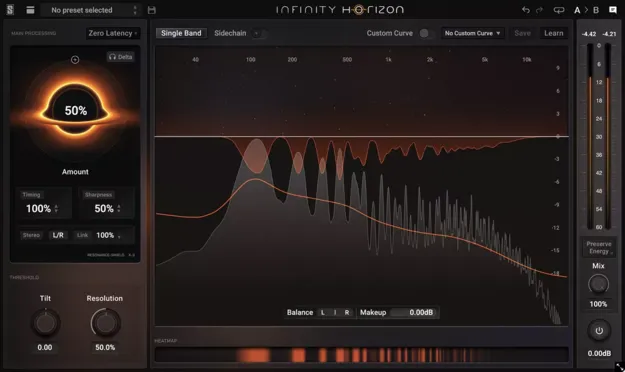
Infinity Horizon by Slate Digital resonance suppression plugin interface

Infinity Horizon: Resonance-Suppression EQ Plugin by Slate Digital

Infinity Horizon is a dynamic EQ-style effects plugin by Slate Digital that finds harsh frequency build-ups and smooths them in real time across four adjustable bands.

VST3VST2AUAAXWindowsmacOS64-bit
AVAILABLE ATPlugin Boutique
Opens the store in a new tab
01Overview

Infinity Horizon works as a resonance suppressor, detecting frequencies that build up in a track and reducing them as they occur. It can track a changing source over time or learn a section and lock a fingerprint, and factory curves are included as a starting point. A Heat Map shows where resonances accumulate, and click-to-listen makes it quick to audition problem spots. The plugin is available in VST3, VST2, AU and AAX formats for Windows and macOS.

Best for

  • Taming harsh mix build-ups
  • Vocal and guitar separation
  • Mix polish before mastering
  • Live tracking with zero latency
  • Cleaning resonant room tones
Developer
Slate Digital
Category
EQ
Store
Plugin Boutique
02Key features

What you get

  • Adaptive or fixed fingerprint with factory curves included
  • Four independent bands with thresholds, balance and makeup
  • Heat Map with real-time click-to-listen audition
  • Amount, Timing and Sharpness suppression controls
  • Tilt and Resolution for threshold curve refinement
  • Stereo, Mid/Side and per-band balance processing
  • External sidechain for separating competing parts
  • Normal (40-50ms) and zero-latency operation modes
03In depth

Detection, Heat Map and Suppression Controls

The core of Infinity Horizon is its multi-band processing. Splitting the signal into four bands gives each one its own threshold, balance, makeup, bypass and band listen, so you can target a specific range without affecting the rest.

The Heat Map is the fastest way to see where energy is building. Click a hot spot to listen to it in real time before deciding how to treat it. Amount, Timing and Sharpness shape how hard and how quickly the plugin responds, letting you act fast on peaks or smooth out sustained tones. Tilt and Resolution refine the threshold curve for more precise frequency targeting.
Stereo Processing and Sidechain Use

Infinity Horizon can process stereo or Mid/Side signals and bias suppression per band, with Balance for adjusting imaging. This is useful when a problem sits mainly in the center or on one side of the mix.

An external sidechain lets the plugin measure a different signal than the one it processes. Slate Digital suggests using it to carve space between competing parts, such as vocals and guitars. Normal mode runs at 40-50ms latency, while zero latency mode runs at 0 samples for live tracking. Preserve Energy applies automatic loudness compensation so perceived level stays steady when suppression is heavy.

04Specs

Will it run?

Formats, systems and requirements as listed by Plugin Boutique. Missing details are left out, not guessed.

DeveloperSlate Digital
TypePlugin
CategoryEQ
FormatsVST3, VST2, AU, AAX
Operating systemsWindows, macOS
Architecture64-bit
05FAQ

Questions, answered

What formats and operating systems does Infinity Horizon support?

Infinity Horizon is available in VST3, VST2, AU and AAX formats. It runs on Windows and macOS, and the system requirements list AU, VST2 and AAX for macOS and VST2, VST3 and AAX for Windows.

What do I need to run Infinity Horizon?

Slate Digital software requires a free iLok license manager account. The listed minimum is 4GB of RAM and macOS 13 or later, or Windows 10 or Windows 11.

Can Infinity Horizon work with a live signal?

Yes. Its zero latency mode runs at 0 samples of latency for true live tracking, while the normal mode runs at 40-50ms.

07Developer

More from Slate Digital

All Slate Digital products →