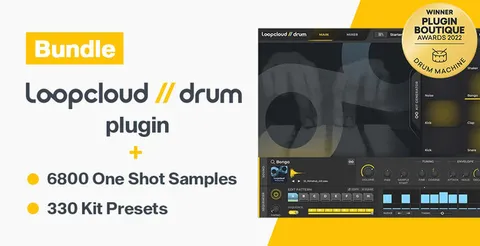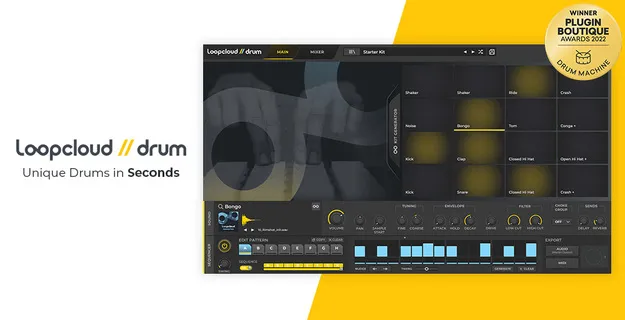
DRUM drum sampler plugin interface by Loopcloud Plugins showing 16 pads

DRUM: Drum Sampler and Loop Generator by Loopcloud Plugins

Rated 4.4/5 on Plugin Boutique (327 ratings)

DRUM is a 16-pad drum sampler and kit builder from Loopcloud Plugins. It generates kits from your samples, sequences patterns and exports audio or MIDI loops to your DAW.

VST3VST2AUWindowsmacOS64-bit
AVAILABLE ATPlugin Boutique
Opens the store in a new tab
01Overview

DRUM is a drum instrument plugin from Loopcloud Plugins for building kits, programming beats and creating loops. Each of its 16 pads can hold a sample with its own volume, pitch, filter and effect controls. A Kit Generator fills the pads in one click, and a 16-step sequencer with swing helps you shape rhythms. Works with the Loopcloud app, which tags your samples automatically so they are easy to find.

Best for

  • Beat making from scratch
  • Loop creation and export
  • Sample library organizing
  • Drum kit experimentation
  • Multi-output drum routing
Store
Plugin Boutique
02Key features

What you get

  • Kit Generator fills all 16 pads with one button press
  • Kit generation history to reload 32 previous kits
  • Pad lock keeps chosen samples while generating new kits
  • 16-pad drum sampler with per-pad filters and effect sends
  • 16-step, 8-bar chainable sequencer with swing
  • Per-step velocity, roll, micro timing and step nudge
  • 16 assignable stereo outputs for multi-track routing
  • Drag and drop audio or MIDI export to your DAW
  • Loopcloud AI auto-tags samples by drum or instrument type
03In depth

Kit Building and Sample Control

DRUM's Kit Generator fills all 16 pads with one press of Generate kit. You can set an instrument per pad, then keep generating and previewing samples until you find a combination you like. Pads you want to keep can be locked, and any pad can be swapped on its own.

Each pad includes volume and pan, fine and coarse pitch, an amp envelope, high-pass and low-pass filters, and delay and reverb sends. The mixer adds master Lo-Fi, distortion, a DJ filter and a limiter, plus 16 assignable stereo outputs for routing individual drums to separate tracks.
Sequencing and Loop Export

The 16-step, 8-bar chainable sequencer includes swing, velocity and roll per step, micro timing, step nudge, and a pattern generator for each lane. Patterns can be triggered from keys C3 to G3 for instant pattern jumps during play.

When a rhythm is ready, drag an audio mixdown or MIDI file straight into your DAW. Exports are imported into the Loopcloud app and tagged automatically, so previous loops stay easy to find. DRUM also keeps a history of kit generations, with the last 32 available to reload.

04Specs

Will it run?

Formats, systems and requirements as listed by Plugin Boutique. Missing details are left out, not guessed.

DeveloperLoopcloud Plugins
TypePlugin
CategoryVirtual Instruments
FormatsVST3, VST2, AU
Operating systemsWindows, macOS
Architecture64-bit
05FAQ

Questions, answered

What formats does DRUM support?

DRUM is available in VST3, VST2 and AU formats. It runs on Windows and macOS, and is 64-bit only.

What do I need to run DRUM?

On macOS, you need macOS 10.15 or later. On Windows, you need Windows 10 or later, 64-bit only. An internet connection is required for the first launch, and the Loopcloud application must be running for DRUM to work.

Does DRUM include sounds?

Yes. DRUM includes over 1000 drum samples and 30 ready-to-use presets, along with full production kits and starter kits. It also supports your own .wav and .aiff files.

Is DRUM compatible with every DAW?

No. DRUM is not compatible with MOTU Digital Performer, and VST2 and VST3 are not compatible with Waveform PRO.

07Developer

More from Loopcloud Plugins

All Loopcloud Plugins products →