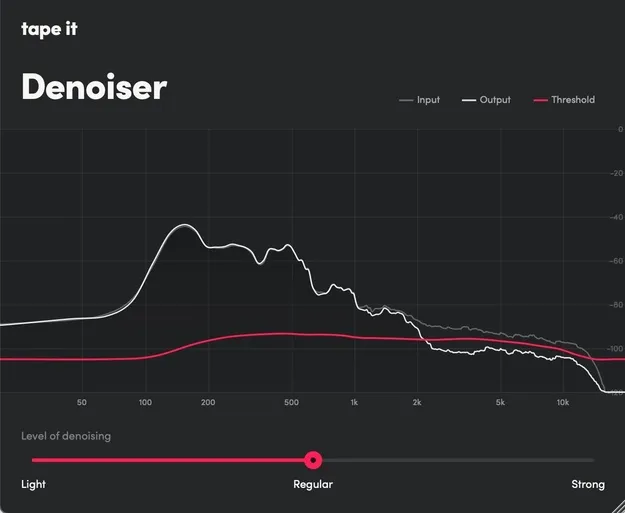
Denoiser by Tape It background noise removal plugin interface

Denoiser: Background Noise Removal Plugin by Tape It

Denoiser by Tape It is a background noise removal plugin for Windows and macOS, available as VST3 and AU. A machine learning model detects the noise profile while a multi-band expander reduces the noise.

VST3AUWindowsmacOS
AVAILABLE ATPlugin Boutique
Opens the store in a new tab
01Overview

Denoiser is a noise reduction plugin from Tape It for cleaning up recordings. It runs as a VST3 or AU plugin inside your DAW and also ships as a standalone app. The developer describes it as an alternative to typical AI denoisers: a machine learning model analyzes the audio and steers a multi-band expander, so the signal itself is processed by established classical components. It supports sample rates up to 192kHz and runs locally on your computer.

Best for

  • Cleaning up audio recordings
  • Unplugged session restoration
  • Removing background noise
  • Denoising clips without silence
  • Channel strip noise reduction
Developer
Tape It
Store
Plugin Boutique
02Key features

What you get

  • Machine learning model detects the noise profile
  • Multi-band expander performs the noise reduction
  • Works without a clean noise-only segment
  • Adapts to noise that changes over time
  • Supports sample rates up to 192kHz
  • Runs locally on your computer
  • Available as VST3 and AU plugin
  • Includes a standalone app
03In depth

How Denoiser Removes Noise

Denoiser uses a machine learning model to listen to the audio and identify the noise profile. The model does not process the audio directly. Instead, it controls a multi-band expander that reduces the noise in the signal.

According to Tape It, this approach avoids the artefacts often heard in audio edited by AI tools, because the processing path relies on well-established signal processing elements.
Working With Recordings and Noisy Clips

Denoiser is designed to detect noise without a clean noise-only segment, which is useful when you have no silent section to learn from. The developer says it adapts to noise that changes over time, which can help with longer recordings such as unplugged sessions.

The plugin is meant to sit in your channel strip, so it can be added directly to a track in your session.

04Specs

Will it run?

Formats, systems and requirements as listed by Plugin Boutique. Missing details are left out, not guessed.

DeveloperTape It
TypePlugin
CategoryAudio Restoration
FormatsVST3, AU
Operating systemsWindows, macOS
05FAQ

Questions, answered

What formats does Denoiser support?

Denoiser is available as a VST3 and AU plugin. It also comes as a standalone app.

Which operating systems can run Denoiser?

Denoiser runs on Windows and macOS, with macOS support listed as Universal.

Can Denoiser work on a recording with no silent section?

Yes. The developer says the machine learning model detects the noise profile without needing a clean noise-only segment.

What sample rates does Denoiser handle?

Denoiser supports sample rates up to 192kHz.