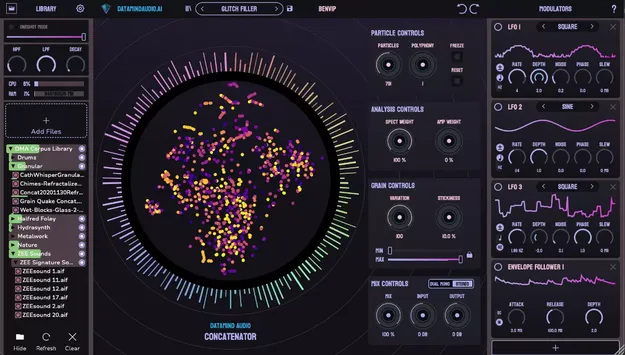
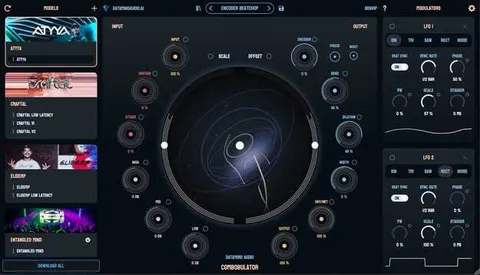
Concatenator by DataMind Audio granular FX plugin interface

Concatenator: Granular FX Plugin by DataMind Audio

Rated 4.2/5 on Plugin Boutique (6 ratings)

Concatenator is a granular effects plugin by DataMind Audio that rebuilds a live input signal from fragments of audio in your sample library. It is available in VST2 and AU formats for Windows and macOS.

VST2AUWindowsmacOS64-bit
AVAILABLE ATPlugin Boutique
Opens the store in a new tab
01Overview

Concatenator takes any microphone, instrument or audio file as a real-time input and reconstructs it using fragments drawn from your own sample library. DataMind Audio describes the process as using proprietary machine learning techniques to analyze the incoming sound and rebuild it from library material. The plugin is aimed at producers and sound designers who want layered, evolving textures, foley-style sounds and rhythmic material without manually cutting and arranging samples.

Best for

  • Foley and sound design
  • Layered evolving textures
  • Rhythm generation from samples
  • Ambient soundscapes
  • Experimental remixing
Category
Granular FX
Store
Plugin Boutique
02Key features

What you get

  • Rebuilds live input audio from fragments of your own sample library
  • Works with microphones, instruments or audio files as input
  • Input high- and low-pass filters and pre-DSP Decay reverb
  • Lasso Select and Corpus Solo for precise corpus control
  • VU meters show which corpus samples are playing
  • Bipolar and unipolar LFO modulation options
  • Particle Freeze and Particle Reset can be modulated
  • Categorized presets with usage descriptions and favourite tags
03In depth

How Concatenator Reshapes Your Sound

The plugin analyzes the live input and selects matching fragments from the corpus, your loaded sample set, to rebuild the audio. You can shape the input signal before it is matched, with high- and low-pass filters and a Decay control that acts as a pre-DSP reverb. This lets you decide which parts of the input drive the result.

Corpus editing gives you direct control over which samples are used. Lasso Select chooses the samples available to the engine, and Corpus Solo limits the final output to soloed samples only. VU meters show which samples are playing, which helps you find problem areas in a corpus.
Modulation, Presets and Performance Options

Bipolar and unipolar LFO modes give you control over how modulation moves around the center point, and Particle Freeze and Particle Reset can now be modulated. These options are useful when you want the texture to change over time rather than stay static.

The revamped Preset Browser sorts presets by input signal type and desired output. Corpus and settings presets are now one system, and you can load samples or settings separately. An adjustable internal block size lets you trade latency against frequency tracking, and a background processing mode is intended to keep performance consistent regardless of session size.

04Specs

Will it run?

Formats, systems and requirements as listed by Plugin Boutique. Missing details are left out, not guessed.

DeveloperDataMind Audio
TypePlugin
CategoryGranular FX
FormatsVST2, AU
Operating systemsWindows, macOS
Architecture64-bit
05FAQ

Questions, answered

What formats does Concatenator support?

Concatenator is available as a VST2 and AU plugin. It runs on Windows 10 or later and macOS 10.15 or later, and is a 64-bit plugin.

What do I need to use Concatenator?

You need a 64-bit processor and operating system, with at least 4 GB of RAM for minimum use or 16 GB recommended. About 600 MB of free storage is required, and an internet connection is needed for initial activation.

What does Concatenator use as its sound source?

Concatenator rebuilds your live input using fragments from your own sample library, which is called the corpus. The quality and variety of the output depend on the samples you load.

07Developer

More from DataMind Audio

All DataMind Audio products →