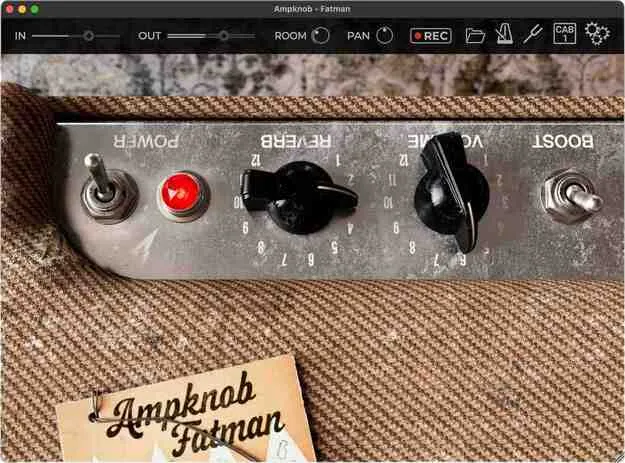
Ampknob Fatman by Bogren Digital amp simulator plugin interface

Ampknob Fatman: Guitar and Bass Amp Simulator by Bogren Digital

Ampknob Fatman is an amp simulator plugin from Bogren Digital, based on a vintage 1950s bass amp design and used for guitar and bass tones. It is available as VST3, AU, AAX and Standalone for Windows and macOS.

VST3AUAAXStandaloneWindowsmacOS
AVAILABLE ATPlugin Boutique
Opens the store in a new tab
01Overview

Ampknob Fatman models a 1950s amp design that the developer describes as a favorite among guitarists for its weight and smooth tone. The plugin includes a boost pedal, an input slider for pushing the circuit into lead tones, and a spring and room reverb. Three matched cabinets are included, and you can also load your own impulse responses. The developer says the plugin is built for quick, distraction-free use, with standalone versions that include a tuner, metronome and riff recorder.

Best for

  • Rhythm guitar tones
  • Lead guitar overdrive
  • Bass amp simulation
  • Practice without a DAW
  • Riff capture and sketching
  • Spring reverb ambience
Store
Plugin Boutique
02Key features

What you get

  • Vintage 1950s amp design modeled for guitar and bass
  • Included boost pedal and volume knob for overdrive
  • Input slider for pushing the circuit into lead tones
  • Spring reverb knob combined with Room control
  • Pan control for separating the guitar from the reverb (stereo output)
  • Three matched cabinets including a bass cabinet
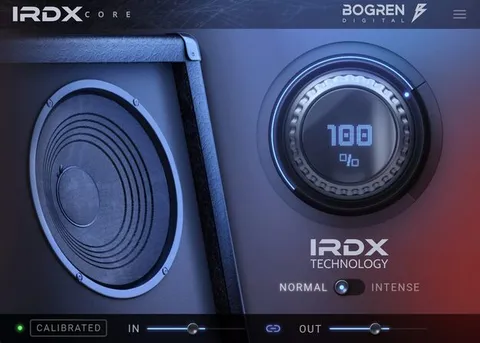
  • Custom IR loading with IRDX dynamic response
  • Standalone version with metronome and riff recorder
  • Built-in tuner and noise gate in plugin and standalone
03In depth

Sound, Drive and Reverb Controls

Bogren Digital describes the Fatman's tone as bouncy and full, with a thick, woody midrange and bass that feels strong without harshness. The boost pedal and volume knob drive the amp into creamy overdrive, and the input slider pushes the circuit further toward lead tones.

The reverb section combines a spring reverb knob with a Room control to add space. The Pan control, available on stereo output only, lets you position the main guitar sound separately from the room and reverb.
Cabinets, IRs and Standalone Use

Three cabinets are included: one matched to the amp, a 4x12 alternative, and a bass cabinet for using the Fatman as a bass amp or a differently voiced guitar amp. You can also load IRs from the Bogren IR packs or any other IR.

The cabinet section uses Bogren Digital's IRDX technology, which the developer says adds a dynamic response to the speaker models and to any IR you load. The standalone version lets you play or practice without opening your DAW, and its riff recorder saves ideas as sound files you can drag into your project.

04Specs

Will it run?

Formats, systems and requirements as listed by Plugin Boutique. Missing details are left out, not guessed.

DeveloperBogren Digital
TypePlugin
CategoryAmp Simulator
FormatsVST3, AU, AAX, Standalone
Operating systemsWindows, macOS
05FAQ

Questions, answered

What formats does Ampknob Fatman support?

Ampknob Fatman is available as VST3, AU, AAX and a Standalone version.

What operating systems does Ampknob Fatman run on?

It runs on Windows 10 or newer and Mac OS 10.13 or newer, with native support for Intel and Apple Silicon Macs.

Can I use Ampknob Fatman for bass?

Yes. The plugin includes a bass cabinet, so you can use the Fatman as a bass amp or as a uniquely voiced guitar amp.

Can I load my own cabinet impulse responses?

Yes. You can load IRs from the Bogren IR packs or any other IR of your choice, and the developer says IRDX affects those IRs as well.

07Developer

More from Bogren Digital

All Bogren Digital products →