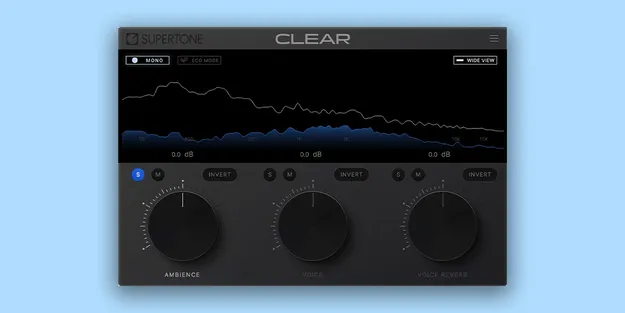
CLEAR by Supertone voice separator plugin interface showing three-channel visualization

CLEAR: De-Noise and De-Reverb Voice Separator Plugin by Supertone Free Download

Rated 4.7/5 on Plugin Boutique (190 ratings)

CLEAR is a de-noise and de-reverb voice separator plugin by Supertone. It splits audio into three channels: ambience, voice and voice reverb, so you can adjust vocal clarity directly.

VST3VST2AUAAXWindowsmacOS64-bit
AVAILABLE ATPlugin Boutique
Free trial available from the developer
01Overview

CLEAR is an effects plugin from Supertone in the vocal processing category. Its neural network models separate a recording into three channels: ambience, voice and voice reverb. Supertone describes the separation as high performance with minimal artifacts. The plugin is built around a simple three-knob control, so you can adjust how clean the voice sounds without digging through deep parameter menus. It is available in VST3, VST2, AU and AAX formats on Windows and macOS.

Best for

  • Vocal cleanup
  • Voiceover noise removal
  • Podcast dialogue repair
  • Reverb reduction on vocals
  • Location audio cleanup
Developer
Supertone
Store
Plugin Boutique
02Key features

What you get

  • Neural network de-noise and de-reverb for voice
  • Separates audio into ambience, voice and voice reverb
  • Intuitive three-knob control
  • Combined and split three-channel audio visualization
  • Low CPU option for wider use
  • Channel controls for quick, accurate monitoring
  • Supports online and offline workflows
  • Sample rates of 44.1, 48 and 96 kHz
03In depth

How the Three-Channel Separation Works

CLEAR splits incoming audio into ambience, voice and voice reverb. Each channel can be monitored on its own, or the three can be viewed together in a combined visualization. The split view makes it easier to see where noise and room reverb sit relative to the voice.

Supertone says the separation algorithm leaves minimal artifacts in the result. The De-Noise and De-Reverb stages are the core of the plugin, and the channel controls are designed for quick, accurate monitoring so you can check what you are removing before you commit to the result.
Controls, Performance and Workflow

The interface centers on three knobs, which keeps the plugin quick to set up. A Low CPU option is available for running CLEAR across more tracks in a session.

CLEAR supports both online and offline workflows, so it can be used during live-style monitoring as well as when processing recorded material. Supertone recommends an I/O buffer size of 256 or higher, and the supported sample rates are 44100Hz, 48000Hz and 96000Hz.

04Specs

Will it run?

Formats, systems and requirements as listed by Plugin Boutique. Missing details are left out, not guessed.

DeveloperSupertone
TypePlugin
CategoryVocal Processing
FormatsVST3, VST2, AU, AAX
Operating systemsWindows, macOS
Architecture64-bit
Free trialYes
05FAQ

Questions, answered

What is CLEAR used for?

CLEAR is used to remove noise and room reverb from voice recordings. It separates a signal into ambience, voice and voice reverb so you can control how clean the voice sounds.

Which formats and operating systems does CLEAR support?

CLEAR is available in VST3, VST2, AU and AAX formats. It runs on Windows 10 and later (64-bit only) and macOS 10.13 and later, with native support for Apple Silicon.

What do I need to use CLEAR?

CLEAR is a plugin and needs a compatible host application that supports VST3, VST2, AU or AAX. Supertone recommends an I/O buffer size of 256 or higher, and it supports 44.1, 48 and 96 kHz sample rates.

Does CLEAR offer a trial?

Yes, CLEAR has a trial version.

07Developer

More from Supertone

All Supertone products →