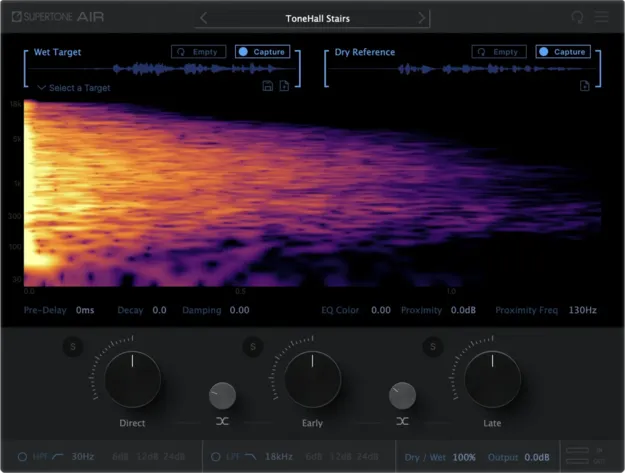
AIR by Supertone dialogue match reverb and EQ plugin interface

AIR: Dialogue Match Reverb and EQ Plugin by Supertone

AIR is a reverb and EQ dialogue match plugin by Supertone that captures the acoustic character of production dialogue and applies it to dry ADR recordings.

VST3VST2AUAAXWindowsmacOS64-bit
AVAILABLE ATPlugin Boutique
Opens the store in a new tab
01Overview

AIR is built for post-production work where ADR needs to sit in the same space as the production dialogue. It analyzes a captured dialogue clip and extracts its reverb and EQ characteristics, then applies them to any dry recording. Supertone designed it around the reflections of a room, which are difficult to reproduce by hand but central to how dialogue sounds in a scene. Profiles can be exported, shared across machines, and used with offline processing inside your session.

Best for

  • ADR matching
  • Dialogue editing
  • Re-recording mixing
  • Post-production sound
  • Production dialogue matching
Developer
Supertone
Store
Plugin Boutique
02Key features

What you get

  • Captures reverb and EQ from existing dialogue recordings
  • Accurate early reflection estimation via Acoustic Scene Transfer
  • Gain control for direct, early and late reflections
  • Traditional reverb parameters plus neural network controls
  • Built for Pro Tools Audio Suite with offline processing
  • Profile import and export for sharing across devices
  • Download impulse response as WAV files
03In depth

Matching Reverb, Early Reflections and EQ

AIR focuses on capturing the reverb and EQ of a production recording. Supertone says its Acoustic Scene Transfer technology estimates early reflections, which the developer describes as hard to replicate yet important to the sense of space in dialogue.

For finer control, AIR includes traditional reverb parameters alongside additional parameters tied to its neural network model. Gain can be adjusted separately for direct sound, early reflections and late reflections, so you can balance the match to suit the scene.

The result is a profile you can refine rather than a fixed preset, which helps when a clip needs to sit closer to the production or drift slightly from it.
Workflow for Pro Tools Audio Suite and Offline Editing

AIR is built for Pro Tools Audio Suite, so it can capture a clip and process it offline within your project. This suits dialogue editors and re-recording mixers who work on large sessions and need repeatable results.

Profiles can be exported and imported across devices, which makes it practical to keep a consistent sound across workstations. You can also download the impulse response as WAV files for use in other tools.

Supertone recommends an I/O buffer size of 256 or higher when running AIR.

04Specs

Will it run?

Formats, systems and requirements as listed by Plugin Boutique. Missing details are left out, not guessed.

DeveloperSupertone
TypePlugin
CategoryVocal Processing
FormatsVST3, VST2, AU, AAX
Operating systemsWindows, macOS
Architecture64-bit
05FAQ

Questions, answered

What is AIR used for?

AIR is used to match the reverb and EQ of a production dialogue recording so that ADR or other dry dialogue sounds like it was recorded in the same space.

Which formats and operating systems does AIR support?

AIR is available in VST3, VST2, AU and AAX formats, and runs on Windows and macOS in 64-bit. Supported systems are macOS 10.13 and above, with native Apple Silicon support, and Windows 10 and above.

What do I need to use AIR?

AIR runs as a plugin in a compatible host. Supertone supports sample rates of 44100Hz, 48000Hz and 96000Hz and recommends an I/O buffer size of 256 or higher.

07Developer

More from Supertone

All Supertone products →